“Do I really have to type in the whole season schedule?”
Add events without typing them in.
Describe an event in your own words, take a photo of the flyer, or attach the PDF of the season schedule. Famzil pulls out the events, and you review them before anything is added.
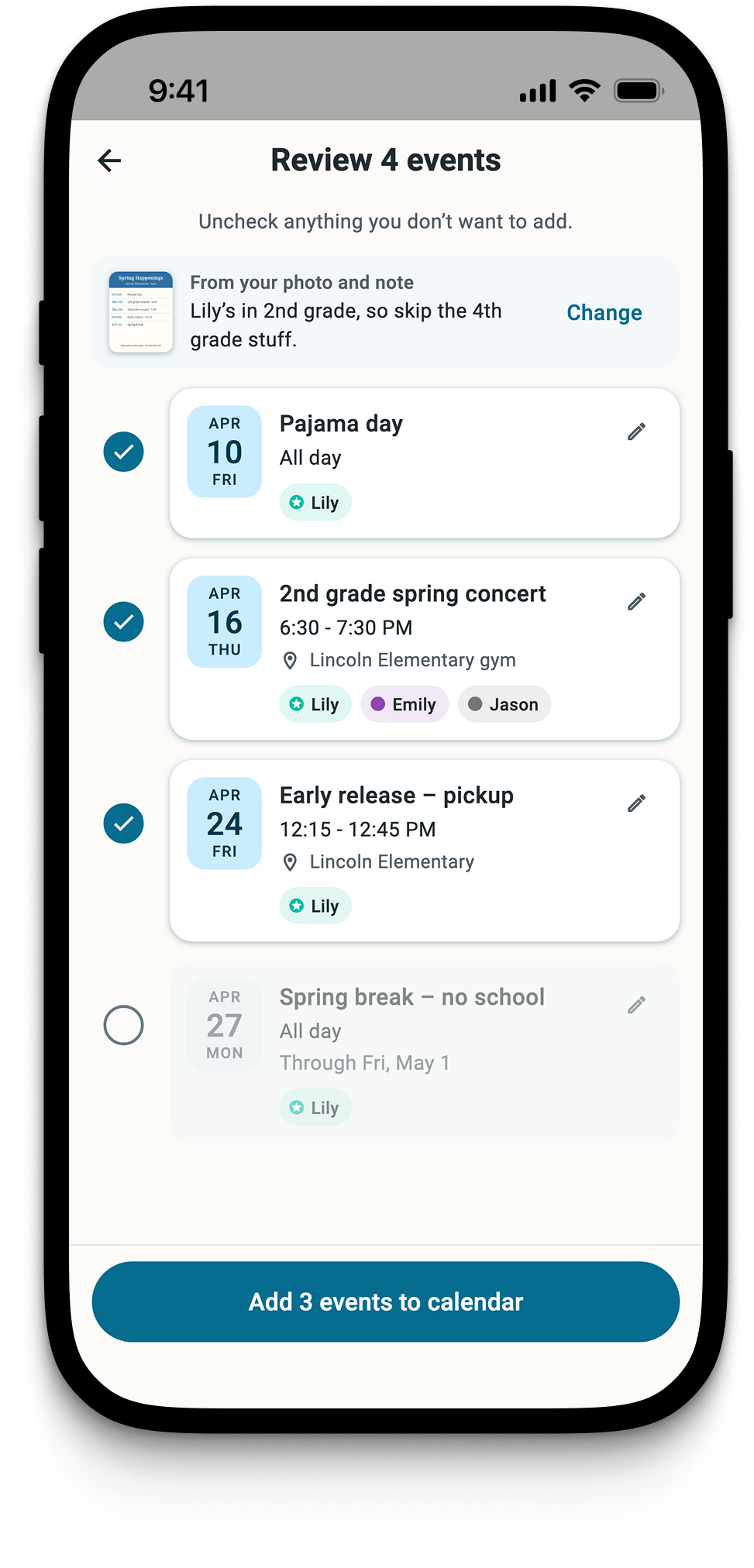
Here's how it works.
-
1
Describe it, snap it or attach it
Type “Noah has swim lessons Tuesdays and Thursdays at 4:30,” take a picture of the flyer, or attach a PDF or image.
-
2
Famzil fills in the details
Dates, times, location, who's going, notes and repeat rules are pulled out for you.
-
3
Review, then add
Uncheck anything you don't want and edit the rest. Nothing goes on the calendar until you say so.
What you get
In your own words
Describe an event the way you'd text it to the family, and Famzil turns it into a calendar event.
Photos and screenshots
The school flyer, the party invite, the fridge whiteboard or a screenshot of a team message.
Whole schedules at once
Attach the PDF of a full season or a school calendar, and keep only the events you want.
Send it to Famzil
Share a photo or file to Famzil from another app, and see a preview of it before the events are added.
You stay in charge
Every event is shown for review first, so you can fix a detail or skip it before it's saved.
Related features
Get your family on the same page.
Famzil runs on iPhone, iPad, Android and the web.